Amazon Product Image Requirements - Complete 2026 Guide
Selling on Amazon means playing by their rules, and nowhere is this more critical than with product images. A single image violation can suppress your listing, killing visibility and sales overnight. This comprehensive guide walks you through Amazon's product image requirements for 2026—from main image specifications to category-specific rules—so you can create compliant images that convert browsers into buyers.
Amazon's algorithm heavily favors listings with compliant, high-quality images. Sellers who master these requirements typically see 25-40% higher click-through rates. Also selling on Etsy? Our Etsy Product Image Requirements guide covers handmade marketplace specifics.
Amazon Image Requirements at a Glance
| Specification | Main Image | Secondary Images |
|---|---|---|
| Background | Pure white (RGB 255, 255, 255) | Flexible (any color) |
| Product Coverage | 85% of frame minimum | Varies by purpose |
| Minimum Pixels | 1000 px longest side | 500 px longest side |
| Recommended Size | 2000+ px longest side | 1600+ px longest side |
| Maximum Size | 10,000 px | 10,000 px |
| File Formats | JPEG, PNG, TIFF, GIF | JPEG, PNG, TIFF, GIF |
| File Size | 10 MB maximum | 10 MB maximum |
| Text/Logos | Prohibited | Limited allowance |
Critical takeaways:
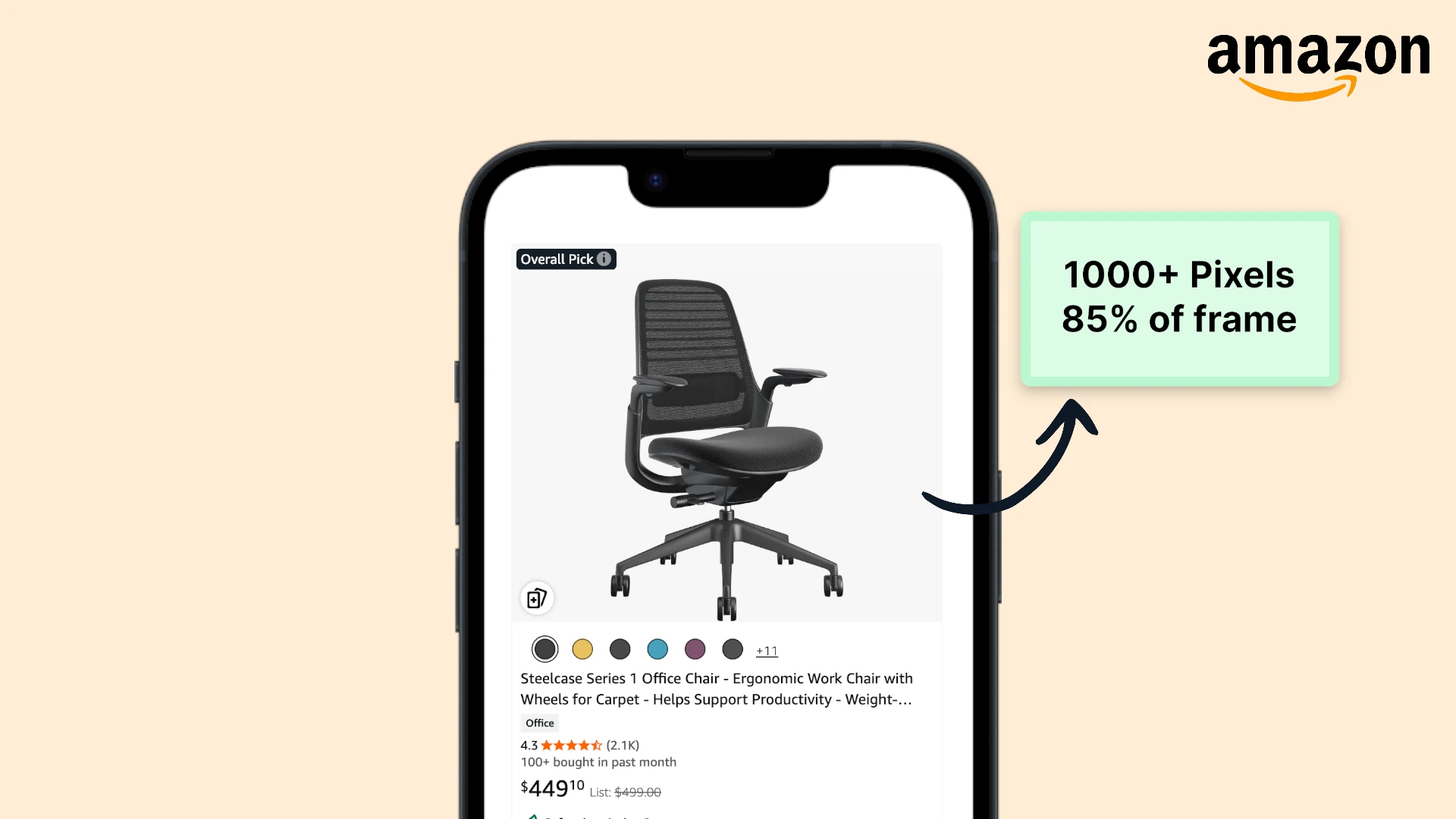
- Main image background: Must be pure white (RGB 255, 255, 255) with no exceptions
- Zoom functionality: Requires 1000 pixels minimum on longest side
- Optimal quality: 2000+ pixels enables superior zoom and increases conversions
- Product prominence: Must fill 85% of the image frame
Main Image Requirements: The Make-or-Break Rules
Your main image is what customers see first in search results and is subject to Amazon's strictest requirements. Violating even one rule can result in listing suppression.
Pure White Background (Non-Negotiable)
Amazon's most enforced rule: main images must have a pure white background with exact RGB values of 255, 255, 255. This isn't "off-white" or "light gray"—it's pure white.
Why Amazon enforces this:
- Creates uniform appearance across search results
- Maintains professional marketplace aesthetic
- Allows Amazon to composite images on various backgrounds
- Ensures focus stays on the product
Even slightly off-white backgrounds (RGB 254, 254, 254) can trigger violations. Use a color picker to verify your background is exactly 255, 255, 255 before uploading. Amazon's automated systems check this rigorously.
Product Must Fill 85% of Frame
Your product should occupy at least 85% of the image area. Too much white space makes products appear smaller in search results and reduces click-through rates.
Measuring the 85% rule:
- The product itself (not shadows) should span 85% of the image width or height
- For square products, this typically means edge-to-edge with minimal margin
- For elongated products, measure against the longest dimension
Underfilled images (product too small in frame) hurt conversions because your product appears smaller than competitors in search results. Amazon may not suppress these listings, but you're handicapping yourself.
No Text, Logos, or Watermarks
Main images must show only the product. Prohibited elements include:
- Brand logos or watermarks
- Text overlays or callouts
- Graphics, badges, or icons
- Props or accessories not included with purchase
- Inset images or multiple views
- Borders or framing elements
Exception: Text that's physically part of the product itself (like book covers, product packaging, or screen displays) is allowed.
Product Must Be Actual Item
Amazon requires professional product photography—not illustrations, mockups, or placeholders:
- ❌ 3D renders or digital mockups
- ❌ Graphic illustrations or drawings
- ❌ Placeholder images
- ✅ Actual product photographs
The image must accurately represent what customers will receive. Misleading images lead to returns, negative reviews, and potential account suspension.
Image Quality Standards
Beyond technical requirements, Amazon expects professional-quality photography:
- Sharp focus: No blurriness or motion blur
- Proper lighting: Even illumination without harsh shadows
- Accurate colors: Colors must match the actual product
- No pixelation: High resolution without compression artifacts
- Clean presentation: Product should appear new and clean
Amazon's algorithm can detect image quality issues using computer vision. Low-quality images may not technically violate rules but will receive lower search ranking compared to professionally photographed competitors.
Technical Specifications: Size, Format, and Resolution
Understanding the technical requirements ensures your images display properly and enable all functionality.
Image Dimensions and Zoom Functionality
Minimum requirements:
- Absolute minimum: 500 pixels on the longest side (listing displays but no zoom)
- Zoom minimum: 1000 pixels on the longest side (enables zoom feature)
- Recommended: 2000+ pixels on the longest side (optimal zoom experience)
- Maximum: 10,000 pixels on any side
Images with 2000+ pixels on the longest side provide superior zoom functionality, which is directly correlated with higher conversion rates. Customers who use zoom are 40-50% more likely to purchase.
Why zoom matters:
- Customers can inspect product details, materials, and quality
- Builds confidence in purchase decisions
- Reduces "what does this actually look like?" returns
- Particularly important for apparel, jewelry, and electronics
File Format Requirements
Amazon accepts four image formats:
| Format | Best For | Quality | File Size | Recommendation |
|---|---|---|---|---|
| JPEG (.jpg) | Product photos | Excellent | Small | Use this |
| PNG (.png) | Transparent backgrounds | Excellent | Large | Secondary only |
| TIFF (.tiff) | Archive-quality | Excellent | Very large | Avoid |
| GIF (.gif) | Simple graphics | Poor | Small | Avoid (no animation) |
Best practices:
- Use JPEG for all product photography (best quality-to-size ratio)
- PNG only when transparency is required (rare for Amazon)
- Never use animated GIFs (not supported)
- TIFF creates unnecessarily large files with no visual benefit
File Size and Compression
While Amazon allows up to 10 MB per image, optimal file size depends on dimensions:
- 2000 x 2000 pixels: Target 200-400 KB
- 3000 x 3000 pixels: Target 400-600 KB
- 5000 x 5000 pixels: Target 800 KB - 1.2 MB
Larger files don't improve quality but do slow page loads, especially on mobile devices where over 70% of Amazon shopping happens.
Color Mode: RGB Required
Save all images in RGB color mode (not CMYK):
- CMYK is for print media
- RGB is for screen display
- CMYK images may display with inaccurate colors on Amazon
- Always verify color mode before uploading
Resolution: 72 PPI Standard
Use 72 pixels per inch (PPI) for all Amazon product images - the web-standard resolution for screen display. Higher PPI settings (like 300 DPI for print) only increase file size without improving visual quality on screens.
Secondary Images: More Flexibility, More Opportunities
You can upload up to 9 images per ASIN (1 main + 8 secondary). Secondary images have relaxed requirements but tremendous strategic value.
What's Allowed in Secondary Images
Unlike the restrictive main image, secondary images can include:
- Varied backgrounds: Any color, lifestyle settings, or contextual environments
- Text overlays: Callouts highlighting features or dimensions
- Infographics: Diagrams showing product details or comparisons
- Multiple angles: Back, side, top, bottom views
- Scale references: Products shown in use or with size context
- Close-ups: Texture, materials, or construction details
- Packaging: If it's a selling point (gift boxes, display packaging)
Use secondary images strategically. Each image should answer a specific customer question or objection. Think: "What would prevent someone from buying?" and address it visually.
Still Prohibited in Secondary Images
Even with flexibility, some restrictions remain:
- Amazon logos or branding
- Customer review graphics or ratings
- Pricing or promotional information
- "Best seller" or similar badges
- Offensive or inappropriate content
- Images primarily showing competitors' products
Strategic Use of Secondary Images
Effective secondary image strategy:
- Image 2-3: Multiple product angles (back, side, detail views)
- Image 4-5: Lifestyle or contextual shots (product in use)
- Image 6-7: Infographics with dimensions, features, or comparisons
- Image 8-9: Close-ups of quality details, materials, or unique features
This sequence answers the customer journey: "What is it?" → "How is it used?" → "Why is it better?" → "What's the quality?"
Mobile shoppers swipe through images quickly. Put your most compelling secondary images (lifestyle shots, key features) in positions 2-3 where they're most likely to be seen. Save detailed infographics for later positions.
Category-Specific Requirements
Amazon enforces additional image requirements for certain product categories. Violating category rules will suppress your listing.
Apparel and Accessories
Women's and Men's Clothing:
- Main image must show product on a human model
- Model must be standing, not sitting or lying down
- Model must be photographed on white background
- No additional props or accessories (unless included with product)
- Model should be centered in frame
Kids & Baby Clothing:
- Main image must show product flat or on hanger (no models)
- Pure white background required
- Product fully visible without cutoffs
Why these rules exist: Amazon found that on-model images convert better for adult apparel, while flat-lay images perform better for children's clothing (parents want to see sizing clearly).
Shoes and Footwear
Strict presentation requirements:
- Show a single shoe (not a pair)
- Position at a 45-degree angle facing left
- White background (RGB 255, 255, 255)
- No boxes, bags, or packaging visible
The 45-degree left-facing angle is mandatory for shoes. Right-facing or straight-on images violate Amazon's policy and will trigger listing suppression. This rule applies to all footwear: sneakers, heels, boots, sandals, etc.
Jewelry
- Product must fill 85% of frame (often requires close-up photography)
- Pure white background
- Props (like jewelry stands) are prohibited unless included with purchase
- Multiple angles strongly recommended in secondary images
- Close-ups showing detail are critical for conversions
Electronics
- Show actual product, not stock photos from manufacturer
- Power cords and included accessories can be shown in secondary images
- No screenshots of software or UI (unless the product is software)
- Packaging shown only if it's a key feature
Books, Media, and Print
- Cover must be fully visible
- No promotional stickers or sale badges
- If physical product, show actual item (not just cover art)
Consequences of Non-Compliance
Amazon takes image violations seriously, with penalties that directly impact your revenue.
Listing Suppression
What happens:
- Your listing disappears from search results
- Direct URL still works, but no organic traffic
- Sponsored ads may be paused automatically
- Sales drop to near-zero overnight
How to fix:
- Replace violating images with compliant versions
- Resubmit listing for review
- Resolution typically takes 24-48 hours
Listing suppression is automatic. Amazon's AI detects violations and suppresses listings without warning. By the time you notice sales dropped, you've already lost days of revenue. Prevention through compliance is crucial.
Account Health Impact
Repeated image violations affect your Account Health Rating:
- Multiple violations trigger manual review
- Pattern of violations may restrict listing creation
- Severe or intentional violations can lead to suspension
- Reinstatement requires detailed Plan of Action
Reduced Search Ranking
Even if not suppressed, non-compliant or low-quality images hurt performance:
- Amazon's A9 algorithm considers image quality
- Click-through rate suffers with poor images
- Lower CTR leads to reduced search ranking
- Creates downward spiral of visibility
Customer Experience Issues
Beyond Amazon's penalties, poor images cause:
- Higher return rates (product didn't match expectations)
- Negative reviews mentioning "misleading photos"
- Lower conversion rates (customers can't see details)
- Lost Buy Box eligibility due to poor performance metrics
Optimization Strategies Beyond Compliance
Meeting Amazon's requirements is baseline. These strategies help you outperform competitors.
Professional Photography vs. AI Generation
Traditional photography:
- Full control over lighting and composition
- Initial investment in equipment ($500-5000)
- Time-intensive shooting and editing
- Difficult to maintain consistency across large catalogs
AI-generated images (like prodlens.ai):
- Consistent quality across all products
- No photography equipment needed
- Fast turnaround (minutes vs. hours)
- Easy to create variations for A/B testing
- Starting resolution of 1024x1024px with upscaling to 2048x2048px
Both approaches can produce Amazon-compliant images. Choose based on your catalog size, budget, and time constraints.
A/B Testing Your Images
Amazon Brand Registry members can A/B test main images:
- Test different product angles
- Try lifestyle vs. product-only shots (in secondary images)
- Measure which images drive higher conversion
- Iterate based on data, not assumptions
Even without Brand Registry, you can test by swapping images and monitoring performance metrics over 2-4 week periods.
Lifestyle Images in Secondary Slots
While main images must be product-only, secondary images offer storytelling opportunities:
- Show product in realistic use cases
- Demonstrate scale with environmental context
- Appeal to emotional buying triggers
- Differentiate from competitors using stock photos
Balance: Include both practical images (measurements, features) and emotional images (lifestyle, aspirational use).
Infographics That Convert
Well-designed infographic images answer customer questions visually:
- Product dimensions with clear measurements
- Feature comparisons vs. competitors
- What's included in the box
- How to use the product
- Material or construction details
Keep text on infographics minimal and mobile-optimized. Over 70% of Amazon shoppers use mobile devices where small text becomes unreadable. Use large, bold fonts and simple layouts.
Seasonal and Promotional Variations
Update secondary images seasonally:
- Holiday-themed lifestyle shots (October-December)
- Summer use cases for relevant products
- Back-to-school applications (July-August)
- Gift-ready presentation during peak seasons
Keep main image consistent for brand recognition, but rotate secondary images to stay relevant.
Tools and Resources for Compliance
Staying compliant is easier with the right tools.
Image Requirement Checkers
Several tools help verify Amazon compliance before uploading:
Levi's Toolbox Amazon Product Image Checker:
- Free online tool: levistoolbox.com/amazon-product-image-checker
- Upload your image to check for requirement violations
- Verifies background color, dimensions, and common issues
- Provides instant feedback on compliance status
- Ideal for spot-checking images before bulk upload
Use image checkers as a final verification step, not a replacement for understanding requirements. Automated tools catch most issues but may miss category-specific rules or subtle violations.
Background Removal Tools
Getting that pure white background can be challenging:
- Remove.bg: AI-powered background removal with white background replacement
- Adobe Photoshop: Manual selection and replacement (most control)
- Canva: Simple background removal and white background templates
- prodlens.ai: Generates images with perfect white backgrounds automatically
Compression Without Quality Loss
Reduce file size while maintaining quality:
- TinyPNG/TinyJPG: Lossy compression optimized for photos
- ImageOptim (Mac): Drag-and-drop compression
- Squoosh (Google): Web-based with visual quality comparison
- Target 200-400 KB for 2000x2000px images
Color Verification Tools
Ensure backgrounds are exactly RGB 255, 255, 255:
- Digital Color Meter (Mac): Built-in utility
- ColorPic (Windows): Free color picker
- Browser DevTools: Most browsers have built-in color pickers
- Photoshop Eyedropper: Industry standard for accuracy
Dimension Checking and Resizing
Verify and adjust image dimensions:
- Preview (Mac): Built-in Tools → Adjust Size
- Paint (Windows): Basic resizing capabilities
- GIMP: Free Photoshop alternative
- Bulk Resize Photos: Web-based batch processing
Common Mistakes and How to Avoid Them
Even experienced Amazon sellers make these image errors that cost sales.
Off-White Backgrounds
The mistake: Using "close enough" white backgrounds (RGB 250, 250, 250)
The problem:
- Amazon's automated system detects non-compliant backgrounds
- Listing gets suppressed automatically
- Seller doesn't notice until sales drop
- 24-48 hours lost while fixing and resubmitting
The solution: Always verify RGB values are exactly 255, 255, 255 using a color picker before uploading.
Product Too Small in Frame
The mistake: Leaving excessive white space around product (60-70% coverage instead of 85%)
The problem:
- Product appears smaller than competitors in search results
- Lower click-through rates
- Amazon may flag as non-compliant
- Customers perceive product as lower value
The solution: Crop images so product fills 85-90% of frame. Use photo editing software to verify coverage before uploading.
Using Stock Photos from Manufacturer
The mistake: Copying product photos from manufacturer's website
The problem:
- Same images as competitors (no differentiation)
- May include prohibited elements (logos, text)
- Often don't meet Amazon's specific requirements
- Lower conversion rates compared to unique images
The solution: Create your own product photography or use AI tools to generate unique, compliant images.
Ignoring Category-Specific Rules
The mistake: Using flat-lay clothing images for women's apparel (requires on-model)
The problem:
- Immediate listing suppression
- Complete loss of visibility
- Requires image reshoot or replacement
- Lost sales during suppression period
The solution: Check category-specific requirements before creating images. Amazon's Seller Central lists requirements by category.
Poor Image Quality
The mistake: Uploading blurry, poorly lit, or pixelated images
The problem:
- Lower search ranking (Amazon's A9 considers quality)
- Reduced click-through rates
- Higher return rates
- Negative customer reviews
The solution: Invest in proper photography equipment or use professional services/AI tools. Quality images are worth the investment.
prodlens.ai generates high-quality images at 1024x1024px with perfect upscaling to 2048x2048px, ensuring sharp, professional results that meet Amazon's quality standards without expensive photography equipment.
Inconsistent Image Style Across Catalog
The mistake: Mixing different backgrounds, lighting, and photography styles
The problem:
- Looks unprofessional in your storefront
- Confuses customers about brand identity
- Difficult to maintain as catalog grows
- Lower overall conversion rates
The solution: Establish image style guidelines and stick to them. AI tools make consistency easier by applying the same parameters to all products.
How prodlens.ai Solves Amazon Image Challenges
Creating Amazon-compliant product images traditionally requires significant time, expertise, and resources. There's a more efficient approach.
Automatic Compliance
prodlens.ai generates images that meet Amazon's requirements automatically:
- Pure white backgrounds (RGB 255, 255, 255) every time
- Optimal dimensions: 1024x1024px base with upscaling to 2048x2048px
- Professional lighting without equipment
- Consistent quality across entire catalog
- JPEG format optimized for file size
- Proper RGB color mode
No guesswork, no manual verification, no compliance anxiety.
Fast Catalog Scaling
Traditional photography workflow for 100 products:
- Setup and shooting: 8-12 hours
- Editing and retouching: 6-10 hours
- Background removal: 2-4 hours
- Resizing and optimization: 1-2 hours
- Total: 17-28 hours
With prodlens.ai:
- Upload product photos
- AI generates compliant images
- Download Amazon-ready files
- Total: 30-60 minutes
This efficiency compounds as your catalog grows, letting you focus on sourcing, marketing, and customer service instead of image production.
Perfect Consistency
Maintaining visual consistency across hundreds of products is challenging:
- Lighting varies between shooting sessions
- Different photographers have different styles
- Equipment changes over time
- New products don't match existing catalog
prodlens.ai ensures perfect consistency:
- Identical white backgrounds across all images
- Same lighting model applied universally
- Uniform product positioning
- Your entire catalog looks professionally cohesive
This consistency makes your Amazon storefront look more trustworthy and established, improving overall conversion rates.
Built-in Optimization
Beyond compliance, prodlens.ai outputs:
- Properly compressed files (200-400 KB for 2048x2048px)
- 72 PPI resolution for web display
- Optimal JPEG quality settings
- Files ready to upload directly to Amazon
No additional processing, compression, or optimization needed.
Rapid Variation Testing
Create multiple versions quickly:
- Different backgrounds for seasonal promotions
- Various product angles
- Lifestyle vs. product-only compositions
- A/B test different approaches
Generate variations in minutes rather than scheduling new photo shoots.
The biggest time savings come from elimination of reshoots. Traditional photography often requires multiple sessions to get Amazon-compliant images. AI generation gets it right the first time, every time.
Quick Compliance Checklist
Use this checklist before uploading images to Amazon:
Main Image Requirements
- Pure white background (RGB 255, 255, 255) verified
- Product fills 85% of image frame
- Minimum 1000 pixels on longest side (2000+ recommended)
- No text, logos, or watermarks
- Professional photograph (not mockup or illustration)
- Sharp focus with no blur or pixelation
- Accurate colors matching actual product
- Clean presentation showing product as new
Technical Specifications
- JPEG format (.jpg)
- File size under 10 MB (ideally 200-400 KB)
- RGB color mode (not CMYK)
- 72 PPI resolution
- Maximum 10,000 pixels on any side
- No animated GIFs
Category-Specific Rules
- Apparel on model (adult) or flat (kids)
- Shoes: single shoe, 45° left-facing angle
- Jewelry fills 85% of frame
- Electronics show actual product
- Followed all category requirements for your product
Secondary Images (if applicable)
- Minimum 500 pixels (1600+ recommended)
- No Amazon logos or customer reviews
- Text is minimal and mobile-optimized
- Strategic variety: angles, lifestyle, infographics
- Each image answers a customer question
Quality Standards
- Professional lighting without harsh shadows
- Product is in focus and sharp
- Colors are accurate and vibrant
- No compression artifacts or pixelation
- Tested display on mobile devices
Frequently Asked Questions
Conclusion: Compliance as Competitive Advantage
Amazon's product image requirements aren't just arbitrary rules—they're the foundation of a successful marketplace presence. The pure white background requirement, 85% product coverage, minimum dimensions for zoom functionality, and category-specific guidelines exist to create consistent, trustworthy shopping experiences that convert browsers into buyers.
Mastering these requirements gives you several competitive advantages: your listings stay visible in search results while competitors get suppressed for violations, professional images increase click-through rates by 25-40%, zoom functionality reduces returns and builds buyer confidence, and consistent compliance improves your account health rating.
Remember that meeting Amazon's minimum requirements is just the starting point. The real opportunity lies in creating images that not only comply but also compel—professional photography or AI-generated images that showcase your products beautifully while answering customer questions visually.
Start by auditing your current listings against the compliance checklist above. Fix any violations immediately to prevent suppression. Then systematically upgrade images on your highest-traffic ASINs to optimize for conversions, not just compliance.
Related Articles