Shopify Product Image Sizes - 2026 Guide
Getting your Shopify product image size requirements right isn't just about meeting technical specs—it's about creating shopping experiences that convert. The wrong image dimensions can lead to pixelated zoom views, slow page loads, and ultimately, lost sales. This guide covers everything you need to know about Shopify product image size requirements in 2026, from technical specifications to optimization strategies that actually work.
Bookmark this page! The image specifications in this guide are tested on live Shopify stores generating over $1M in annual revenue. Also selling on other platforms? Check our Amazon Product Image Requirements and Etsy Image Requirements guides for platform-specific rules.
Shopify Image Requirements at a Glance
| Specification | Minimum | Recommended | Maximum |
|---|---|---|---|
| Dimensions | 800 x 800 px | 2048 x 2048 px | 5000 x 5000 px |
| File Size | N/A | 100-300 KB | 20 MB |
| Aspect Ratio | Any | 1:1 (Square) | Any |
| Resolution | N/A | 72 PPI | N/A |
| Format | JPEG/PNG | WebP | WebP/JPEG/PNG |
Key takeaways:
- Optimal size: 2048 x 2048 pixels ensures professional quality with zoom functionality
- File size target: 100-300 KB balances visual quality and page speed
- Best format: WebP reduces file size by 25-35% compared to JPEG
- Minimum for zoom: 800 x 800 pixels (below this disables zoom feature)
What Size Should Shopify Product Images Be?
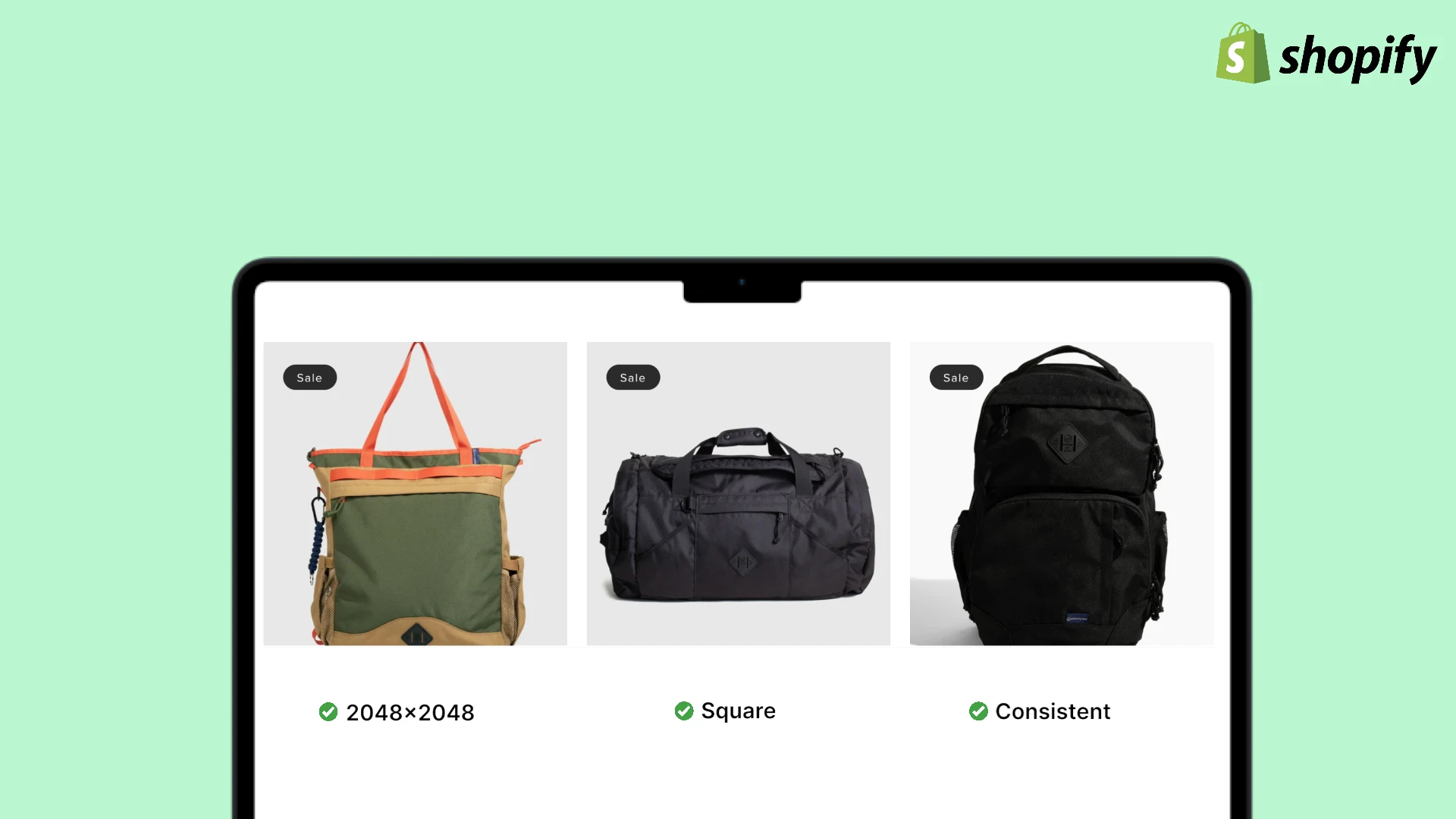
The optimal Shopify product image size is 2048 x 2048 pixels with a 1:1 square aspect ratio. This dimension provides crisp zoom functionality, displays beautifully across all devices, and maintains fast page loads when properly compressed to 100-300 KB.
Images at 2048×2048px hit the sweet spot: high enough resolution for professional zoom, small enough file size (when compressed) for fast loading.
Why 2048 x 2048 Pixels Works Best
This sweet spot for Shopify product images strikes the perfect balance between image quality and performance:
- Provides crisp, professional zoom functionality
- Displays beautifully across all devices
- Maintains fast page load speeds when properly optimized
- Meets Shopify's platform recommendations
Maximum and Minimum Specifications
Shopify's platform has clear boundaries for product image dimensions:
Maximum limits:
- Dimensions: 5000 x 5000 pixels
- File size: 20 MB per image
- While technically supported, images this large create performance issues
Minimum requirements:
- Dimensions: 800 x 800 pixels for zoom functionality
- Any size below 800px will disable the zoom feature
- Lower resolution images appear unprofessional and reduce trust
Never upload images smaller than 800×800px. This disables zoom functionality, and customers can't inspect product details—leading to 30-40% higher cart abandonment rates.
Aspect Ratio Considerations
Square images (1:1 aspect ratio) work best for Shopify stores because they:
- Display consistently across product grids
- Eliminate awkward cropping on mobile devices
- Provide uniform spacing in collections
- Simplify inventory management
However, Shopify does support other aspect ratios like 4:3 or 16:9 for lifestyle shots and banners. Just ensure consistency within product categories.
File Size Optimization
While Shopify allows up to 20 MB per image, your optimal file size should be 100-300 KB after compression. This range provides:
- Sharp visual quality without artifacts
- Fast loading times on mobile networks
- Better SEO performance
- Reduced bandwidth costs
What's the Best Image Format for Shopify?
WebP is the best image format for Shopify in 2026 because it reduces file sizes by 25-35% compared to JPEG without quality loss, has widespread browser support, and improves page load speed—all critical for SEO and conversions.
WebP is supported by 95%+ of browsers in 2026. Modern Shopify themes automatically serve WebP to supported browsers and fall back to JPEG for older ones.
Shopify Image Format Comparison
| Format | Best For | File Size vs JPEG | Quality | Browser Support | Recommendation |
|---|---|---|---|---|---|
| WebP | Product photos | 25-35% smaller | Excellent | 95%+ | Use this |
| JPEG | Product photos | Baseline | Good | 100% (universal) | Fallback |
| PNG | Graphics, transparency | 3-5x larger | Excellent | 100% | Avoid for photos |
| AVIF | Future-proofing | Smaller than WebP | Excellent | ~70% (growing) | Emerging |
Format details:
- WebP: Best overall choice with excellent compression and wide support
- JPEG: Universal fallback when WebP isn't supported
- PNG: Only for graphics requiring transparency (logos, badges)
- AVIF: Consider for future, but limited support currently
Image Resolution: 72 PPI Standard
Shopify product images should be saved at 72 pixels per inch (PPI). This web-standard resolution:
- Displays perfectly on screens
- Keeps file sizes manageable
- Matches how browsers render images
- Higher PPI (like 300) wastes bandwidth without visual benefit
Why Shopify Product Image Size Requirements Matter
Understanding the technical specs is one thing, but knowing why these requirements exist helps you make better decisions for your store.
Impact on Conversion Rates
Product images directly influence purchase decisions:
- 75% of shoppers rely on product photos when making buying decisions
- High-quality images can increase conversions by 30-40%
- Zoom functionality (requiring 800x800px minimum) builds buyer confidence
- Blurry or pixelated images create distrust and cart abandonment
When customers can't see product details clearly, they abandon carts. Images at 2048x2048px provide the resolution needed for confident purchasing, especially for detailed products like jewelry, electronics, or textiles.
Page Speed and SEO Performance
Google uses page speed as a ranking factor, and images are the #1 culprit for slow-loading pages:
- Oversized images (above 500 KB) significantly slow page loads
- Every 1-second delay in load time reduces conversions by 7%
- Mobile shoppers expect pages to load in under 3 seconds
- Properly optimized images improve Core Web Vitals scores
Following Shopify product image size requirements and compressing to 100-300 KB ensures your store loads quickly while maintaining visual quality.
Run your store through Google PageSpeed Insights. If "Optimize Images" appears in the recommendations, your images are too large. Aim for a score above 90 on mobile for best SEO performance.
Mobile Shopping Experience
Over 70% of Shopify traffic comes from mobile devices, where image optimization becomes critical:
- Large images consume mobile data allowances
- Slow-loading images frustrate mobile shoppers
- Properly sized images adapt better to smaller screens
- Touch-based zoom requires high-resolution source images
Meeting Shopify image dimensions ensures seamless experiences across all devices.
Image Optimization Best Practices for Shopify
Beyond meeting basic requirements, these optimization strategies will give your product images a competitive edge.
Compression Without Quality Loss
Compression reduces file size while maintaining visual quality:
Lossy compression:
- Reduces file size by 50-80%
- Slight quality reduction (usually imperceptible)
- Best for product photography
- Use tools like TinyPNG or ImageOptim
Lossless compression:
- Reduces file size by 10-30%
- Zero quality loss
- Better for graphics with text
- Larger final file sizes than lossy
Target goals:
- 2048x2048px images should be 150-250 KB
- 1200x1200px images should be 80-150 KB
- Never sacrifice visual quality for file size
- Test on actual devices to verify quality
Use TinyPNG or Squoosh for compression. These tools can reduce file size by 70% while keeping quality imperceptible to the human eye. Always compare before/after on your phone screen.
Implement Responsive Images
Shopify's theme engine supports responsive images that automatically serve appropriate sizes:
- Desktop users get full 2048x2048px images
- Mobile users receive smaller, optimized versions
- Reduces bandwidth waste
- Improves mobile performance
Most modern Shopify themes handle this automatically, but verify in your theme settings.
Use Consistent Styling
Visual consistency builds brand trust and professionalism:
- Same background color or style across all products
- Consistent lighting and shadows
- Uniform product positioning
- Matching aspect ratios within categories
This consistency makes your store look more professional and helps customers compare products more easily.
Leverage Alt Text for SEO
Every product image needs descriptive alt text that:
- Includes relevant keywords naturally
- Describes the actual image content
- Helps visually impaired shoppers
- Improves SEO performance
Bad: alt="product-img-1.jpg"
Good: alt="Black leather messenger bag with brass hardware, front view"
Alt text is a ranking factor for Google Images, which drives 20-30% of product page traffic for visual products. Write alt text for humans first, SEO second.
Enable Lazy Loading
Lazy loading defers image loading until they're needed:
- Images load as users scroll down
- Reduces initial page load time
- Improves Core Web Vitals scores
- Built into most modern Shopify themes
Verify lazy loading is enabled in your theme's settings.
Optimize Image File Names
Before uploading, rename files descriptively:
- Use keywords:
navy-cotton-tshirt-front.jpg - Avoid:
IMG_0001.jpgorDSC1234.jpg - Use hyphens (not underscores)
- Keep names concise but descriptive
This helps with image SEO and internal organization.
Mobile Optimization Strategies
With mobile dominating e-commerce traffic, mobile-specific optimization is essential.
Thumb-Friendly Zoom
Mobile shoppers need easy zoom access:
- Images must be at least 800x800px
- Pinch-to-zoom should feel responsive
- Ensure zoom reveals meaningful detail
- Test on actual mobile devices
Optimize for Touch Interactions
Mobile users interact differently with images:
- Provide multiple product angles (swipe galleries)
- Use larger touch targets for image thumbnails
- Enable full-screen image viewing
- Consider 360-degree product views for complex items
Reduce Mobile Data Usage
Be conscious of mobile data consumption:
- Serve WebP format for supported browsers
- Implement responsive images properly
- Compress aggressively for mobile versions
- Monitor actual mobile performance metrics
Test on Real Devices
Emulators don't tell the whole story:
- Test on various phone models
- Check loading speeds on 3G/4G networks
- Verify image quality on different screen densities
- Get feedback from actual mobile shoppers
Common Mistakes to Avoid
Even experienced Shopify merchants make these image mistakes that hurt sales.
Uploading Oversized Images
The mistake: Uploading 4000x4000px images straight from the camera
The problem:
- Files are 2-5 MB each
- Pages load slowly
- Mobile users abandon
- Google penalizes slow sites
The solution: Resize to 2048x2048px and compress to 100-300 KB before uploading.
Using Inconsistent Dimensions
The mistake: Mixing 1000x1000px, 1500x2000px, and 800x600px images
The problem:
- Product grids look unprofessional
- Images get awkwardly cropped
- Inconsistent zoom functionality
- Customers notice and trust decreases
The solution: Standardize on 2048x2048px for all main product images.
Ignoring File Format
The mistake: Always using PNG because "it's higher quality"
The problem:
- PNG files are 3-5x larger than JPEGs
- No visual benefit for photographs
- Wastes bandwidth
- Slows page loads unnecessarily
The solution: Use WebP or JPEG for photos, PNG only for graphics needing transparency.
Skipping Compression
The mistake: Uploading images directly without compression
The problem:
- File sizes remain unnecessarily large
- Page speed suffers
- SEO rankings drop
- Mobile experience degrades
The solution: Always compress images before uploading, targeting 100-300 KB for 2048x2048px images.
Poor Quality Source Images
The mistake: Starting with low-resolution phone photos
The problem:
- Upscaling creates blurry, pixelated results
- Can't be fixed after the fact
- Looks unprofessional
- Reduces customer trust and conversions
The solution: Invest in proper product photography from the start, or use AI tools that generate high-resolution images automatically.
prodlens.ai generates images at the correct resolution from the start—no upscaling from poor-quality sources. AI creates clean, professional product photos at 1024×1024px with perfect one-click upscaling to 2048×2048px.
Neglecting Mobile Testing
The mistake: Only checking images on desktop
The problem:
- Mobile issues go unnoticed
- Majority of customers see the broken version
- Conversions suffer silently
- Bad reviews mention image quality
The solution: Test every product page on actual mobile devices before launching.
Creating Compliant Images with prodlens.ai
Meeting Shopify product image size requirements while maintaining studio-quality visuals traditionally requires expensive photography equipment, professional expertise, and time-consuming editing workflows. There's a faster, more affordable solution.
Fast Path to Shopify-Optimized Images
prodlens.ai generates studio-quality product images at 1024 x 1024 pixels (meets Shopify's minimum zoom requirement), with built-in upscaling to reach the optimal 2048 x 2048 pixels specification. The workflow is streamlined:
- AI generates images at 1024×1024px (sufficient for zoom functionality)
- One-click upscaling to 2048×2048px for maximum quality
- Consistent square 1:1 aspect ratio automatically maintained
- No manual resizing or dimension checking needed
- Ready to upload directly to Shopify
This two-step process is still dramatically faster than traditional photography and manual editing.
Studio-Quality Results Without a Studio
Traditional product photography requires:
- Professional lighting equipment ($500-5000)
- Backdrop and staging materials
- Photo editing software and skills
- Hours of shooting and editing time
- Consistent lighting conditions
prodlens.ai uses AI to generate studio-quality product images with:
- Professional lighting automatically applied
- Clean, customizable backgrounds
- Consistent style across all products
- Multiple background options per product
- Output ready to use immediately
Time Savings That Scale
Consider the traditional workflow for 50 products:
- Photography: 4-6 hours
- Editing and retouching: 3-5 hours
- Resizing and optimization: 1-2 hours
- Total: 8-13 hours per 50 products
With prodlens.ai:
- Upload product photos
- AI generates optimized images
- Download Shopify-ready files
- Total: 15-30 minutes per 50 products
This time savings compounds as your catalog grows, freeing you to focus on marketing, customer service, and business growth.
Consistent Brand Aesthetic
Maintaining visual consistency across hundreds of products is challenging with traditional photography:
- Lighting varies between shooting sessions
- Backgrounds get dirty or damaged
- Different editing styles over time
- New products don't match older ones
prodlens.ai ensures perfect consistency by:
- Applying the same style parameters to all images
- Maintaining identical backgrounds
- Using consistent lighting models
- Keeping your entire catalog visually cohesive
This consistency makes your Shopify store look more professional and helps customers focus on product features rather than inconsistent presentation.
Built-in Optimization
Beyond meeting dimension requirements, prodlens.ai outputs:
- Properly compressed files (100-300 KB range)
- WebP format support for modern browsers
- Correct 72 PPI resolution for web use
- Square 1:1 aspect ratio for grid layouts
You get images optimized for both quality and performance without additional processing.
The best time savings come from consistency. Set your image generation parameters once, then every product gets the same perfect specifications automatically. No double-checking, no manual adjustments.
Perfect for Growing Catalogs
Whether you're launching with 20 products or managing 2,000, prodlens.ai scales with your business:
- Generate images product by product with consistent quality
- Quick updates when you need new backgrounds
- Seasonal variations without reshooting
- A/B test different image styles
As your Shopify store grows, your image production keeps pace without hiring additional photographers or editors.
Quick Reference Checklist
Use this checklist to ensure your Shopify product images meet all requirements:
Dimensions and Resolution
- Images are 2048 x 2048 pixels (or larger if needed)
- Square aspect ratio (1:1) for product grids
- Minimum 800 x 800 pixels for zoom functionality
- Saved at 72 PPI resolution
File Specifications
- File size between 100-300 KB after compression
- WebP format preferred (JPEG as fallback)
- PNG only used for images requiring transparency
- File names are descriptive with keywords
Quality Standards
- Images are sharp and in focus
- Consistent lighting across all products
- Clean, professional backgrounds
- Colors are accurate and well-balanced
- No visible compression artifacts
Optimization
- Images compressed without quality loss
- Alt text added to all images
- Lazy loading enabled
- Responsive images configured
- Mobile performance tested
SEO and Accessibility
- Descriptive alt text with keywords
- Proper file naming convention
- Image sitemaps submitted
- Core Web Vitals passing
Mobile Experience
- Images load quickly on mobile networks
- Zoom functionality works smoothly
- Touch interactions feel responsive
- Tested on actual mobile devices
Frequently Asked Questions
Conclusion: Images That Convert
Mastering Shopify product image size requirements is fundamental to running a successful online store. The 2048 x 2048 pixel specification provides the resolution customers expect while maintaining the performance Google rewards. Combined with proper compression (100-300 KB target), WebP format adoption, and mobile optimization, your product images will load quickly and display beautifully across all devices.
Remember that meeting technical specifications is just the baseline. The real goal is creating images that build trust, showcase product details clearly, and ultimately drive conversions. Whether you're shooting with professional equipment, using smartphone cameras, or leveraging AI tools, the key is consistency, quality, and optimization.
Start by auditing your current catalog against the checklist above, then systematically optimize your highest-traffic products first. The conversion improvements from professional, properly-sized product images will quickly justify the time and resources invested.
Related Articles